Blog · release
Diagramly for teams: one workspace, one bill, Pro for every seat
Start a team, pay per seat, and give everyone Pro plus a shared space of system architecture diagrams they can open and edit together.
Inviting people to one diagram works when the diagram is the unit. A team is not one diagram. It is the checkout architecture, the data model, the incident flow and the onboarding cheat sheet, owned by different people, that everyone needs to find and fix. Sending an invite link for each one, and asking each person to buy their own plan, stops scaling at about four people. A team gives the group one place and one bill.
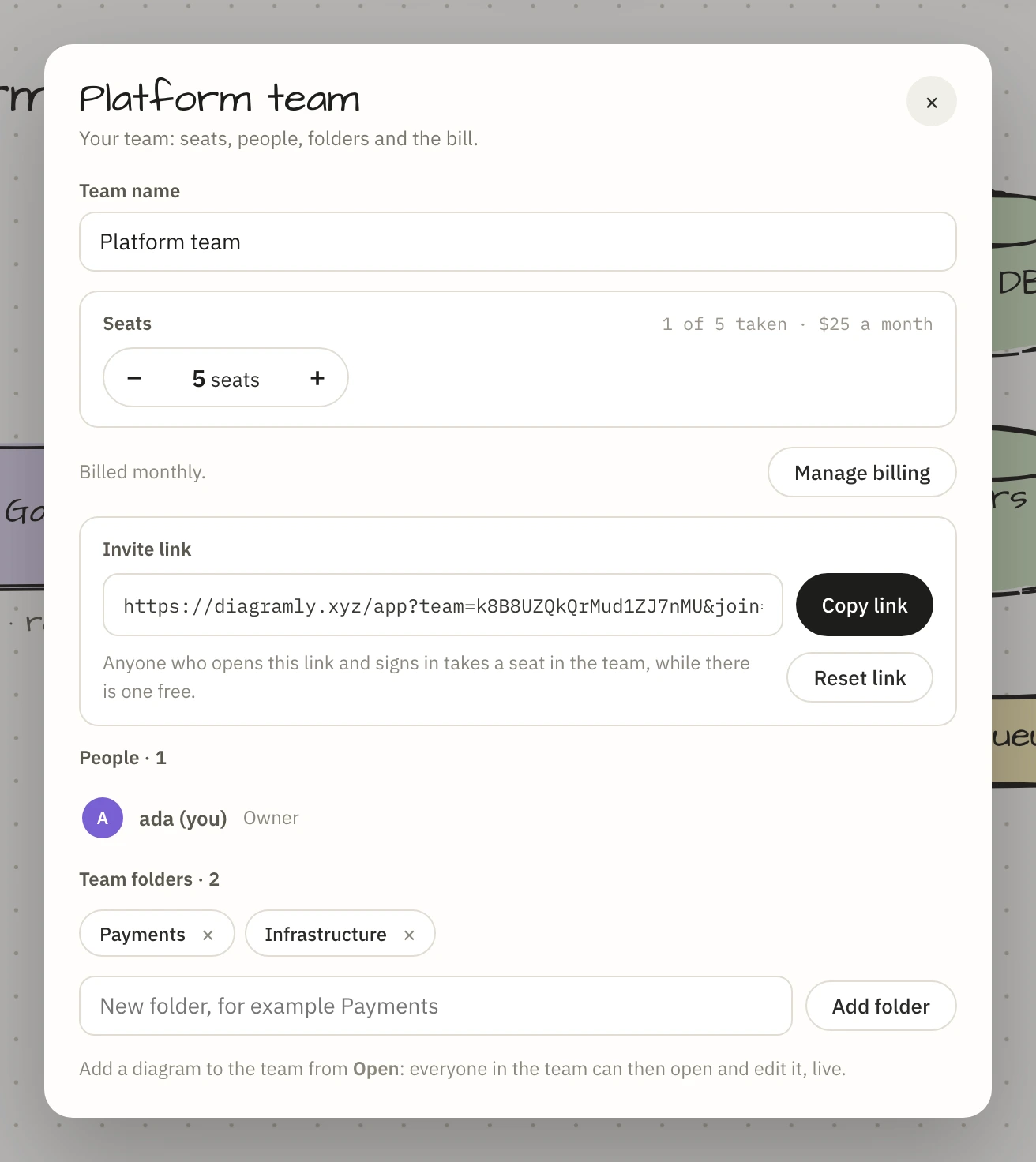
Start a team and pick the seats
Open your account menu and choose Start a team. Give it a name, set the number of seats, choose monthly or yearly, and pay. A seat is a place for one person, you included, so a team of five needs five seats.
When the payment goes through, the sheet shows an invite link. Whoever opens it and signs in takes a seat, for as long as one is free. If the seats run out, the next person is told so and you can add one: change the number, see what it costs today for the rest of the period, and confirm. Removing seats works the same way.
Every seat includes Pro
Each person in the team is on Pro for as long as they hold their seat: unlimited saved diagrams, version history, publishing, Tidy, Pro skins and the rest, on their own diagrams as well as the team's. Nobody in the team needs a plan of their own.
A shared space with folders
Under Open, each of your diagrams gets an Add to button for your team. A diagram you add is open to everyone in the team: they find it in the team's section of Open, and when two of you have it open you are editing it together, live, with cursors, selections and comment threads.
Add folders in the Team sheet, for example Payments and Infrastructure, and file each diagram from its card. Folders belong to the team, so everyone sees the same structure.
A diagram you add stays yours. You can take it back out of the team at any time, and so can the team's owner; nobody else can delete it.
People come and go
The team's owner removes someone from the people list, and a member can leave on their own. Either way the seat is free at once for someone else. The person who left loses the team's diagrams, the live sessions they were in are closed behind them, and the Pro that came with the seat ends. Their own diagrams, and their own plan if they had one, are untouched.
If the plan ends
Nothing is deleted and nobody is removed. Seats stop being Pro, the team's diagrams can still be opened by everyone in it but only saved by their owners, and nobody new can join. Start the plan again and everything comes back as it was.
What it costs
A seat is $5 a month or $40 a year, and a team starts at two seats: $10 a month. The team's owner handles the bill in one place; adding or removing a seat is charged or credited for the rest of the period.
| Pro | Team | |
|---|---|---|
| Price | $6 a month, or $48 a year | $5 a seat a month, or $40 a year |
| Who gets Pro | You | Everyone with a seat |
| Sharing | An invite link for each diagram | One space for the whole team, plus invite links |
| Bill | Yours | One, for the team |
If you work alone and now and then need a reviewer, Pro and an invite link are enough. If the same people keep opening the same set of diagrams, start a team.